Wednesday, October 11, 2017

Zero Downtime Patching in SharePoint Server 2016


Recently needed to do an update of eight farms for a client.  Now I can never do as thorough of a job as Microsoft and others have done describing the process so I will not even attempt it. (see also links at bottom).

What I needed was a way to walk through the whole phase as simply as possible so I wrote and/or borrowed code for a PowerShell script to streamline the process

Basic steps of the script
  1. Copy updates to all servers in farm
  2. Prompt user to remove a web front end (WFE) user from Network Load Balancer(NLB)
  3. Enable Side By Side SharePoint code on that WFE
  4. Trigger the coping of Side By Side files to the c:\program files\common files\microsoft shared\web server extensions\16\template\layouts\{current SharePoint version number}
  5. Prompt user to install patch on this WFE (may possibly automate this) and reboot server
  6. Prompt user to add WFE back into NLB and remove other WFE (could add a loop for more than 2 WFE)
  7. Enable Side by Side on second WFE
  8. Trigger SharePoint file copy
  9. Prompt to install patches on second WFE and reboot server
  10. Disables the Distributed Cache(DC) on the first server designated with the "DistributedCache" role
  11. Prompts user to install patched on this server and reboot.
  12. Re-enables the distributed cache on this server
  13. Disables the DC on the second server
  14. Prompts to install patches and reboot server
  15. Re-enables the distributed cache on this server
  16. Runs database upgrade on all content databases
  17. Runs PSConfig on each server one at a time maintaining availability of all services
  18. Set Side By Side to the new version that has just been installed on all servers

Command Line

PS> .\SP-UpdateFarm.ps1 -farmaccount "test\test-farm" -weburl "https://test-partner.example.com/" -wfeSvr01 "TESTWFE01" -wfeSvr02 "TESTWFE01" -otherSvrs01 @( "TESTAPP01", "TESTSRCH01", "TESTDCS01") -otherSvrs02 @( "TESTAPP02", "TESTSRCH02", "TESTDCS02") -test $true

Parameters

[string] $farmaccount  ="The Farm account to connect to SharePoint"
[string] $weburl ="Web application URL to the use for upgrading"
[string] $wfeSvr01 = "Name of the first Web Front End"
[string] $wfeSvr02 ="Name of the Second Web Front End"
Array $otherSvrs01="Other servers in your HA farm all 01"
Array $otherSvrs02 ="Other servers in your HA farm all 02"
[string] $patchFolderUNC ="UNC to copy the upgrade files from"
[string] $patchInstallFolder="The folder to place the upgrade files in on remote servers"
[bool]$test ="run through script connecting to servers but not actually performing actions"

Gotchas

  • if you have a folder in the "web server extensions\16\template\layouts" folder that looks like a version number for example 1.2.3.4 it can be deleted when you enable the Side By Side
  • remote powershell must be allowed for this to work
  • you must run as Farm account
  • PowerShell must be run as Administrator

SP-UpgradeFarmZDP.ps1


See also:
https://technet.microsoft.com/en-us/library/mt767550(v=office.16).aspx
https://technet.microsoft.com/en-us/library/mt743024(v=office.16).aspx
https://blogs.technet.microsoft.com/pla/2016/03/10/zero-downtime-patching-in-sharepoint-server-2016/
https://technet.microsoft.com/en-us/library/cc748824(v=office.16).aspx


Tuesday, September 15, 2015

Nintex Task Form NullReferenceException

Brief history, a client of mine had workflows created in Nintex on Sharepoint 2010 that did not use Nintex forms. These workflows were ported to  SharePoint 2013 with Nintex Forms.  After that none of the a “Request review”, “Request data” or a “Request approval” activity would work.
The simplest way to recreated the error was to preview the form but you would get the same error if you published and ran the workflow.


Exception Details: System.NullReferenceException: Object reference not set to an instance of an object.


Source Error: 

An unhandled exception was generated during the execution of the current web request. Information regarding the origin and location of the exception can be identified using the exception stack trace below. 

Stack Trace: 


[NullReferenceException: Object reference not set to an instance of an object.]

Nintex.Forms.SharePoint.ApplicationPages.PreviewNintexForm.GetDefaultValuesForWorkflowVariables() +557
Nintex.Forms.SharePoint.ApplicationPages.PreviewNintexForm.InitializeData() +846
Nintex.Forms.SharePoint.ApplicationPages.PreviewNintexForm.OnInit(EventArgs e) +645
System.Web.UI.Control.InitRecursive(Control namingContainer) +186
System.Web.UI.Page.ProcessRequestMain(Boolean includeStagesBeforeAsyncPoint, Boolean includeStagesAfterAsyncPoint) +2098

After "debugging" the Nintex's code I determined that it was using a XML file stored in a hidden SharePoint list. This XML file contained the form as well as the workflow variable definitions. 

It turns out that earlier versions of Nintex stored blank variables as . The new version stores them as the code did not support the old format.

All I had to do was go through all the workflow variables and assign them a single space as the default value and the forms started working again.

Thursday, September 11, 2014

Select all items in a MultiLookupPicker


I had a client that wanted all options in a multi-select lookup field to be selected when a new item was created


Then the user could deselect what they did not need, more common to need all. Well it turns out you can't specify the default values for a multi-lookup field.

I came across this post from Bil Simser (thanks) that gave me the ideas for this JavaScript function to select all the possible options in a specific MultiLookupPicker item.  The argument is the name of the field you want to select from, there could be more than one on the page.

jQuery.fn.exists = function () {
    return this.length !== 0;
};

SD.SP2010.MultiLookupPicker.SelectAll = function(pickerTitle) {
    if (jQuery("[id$='_SelectCandidate'][title^='" + pickerTitle + "']").exists()) {
        // append the new options to our results (this updates the display only of the second list box)
        jQuery("[id$='_SelectCandidate'][title^='" + pickerTitle + "']").children().detach().appendTo("[id$='_SelectResult'][title^='" + pickerTitle + "']");
        var data = jQuery("[id$='_SelectCandidate'][title^='" + pickerTitle + "']").closest("table").siblings("[id$='MultiLookupPicker_data']").val();
        data = data.replace( /\|t \|t /g , "");
        // append the new options to our hidden field (this sets the values into the list item when saving)   
        jQuery("[id$='_SelectCandidate'][title^='" + pickerTitle + "']").closest("table").siblings("[id$='MultiLookupPicker']").val(data);
    }
};

Tuesday, April 15, 2014

Using SharePoint CSOM to access a list's information using folder/internal name

Been quite some time since I posted anything but I could not find any place on the net that talked about getting a SharePoint list using the CSOM and the lists internal/folder name.   I finally came up with this kludge using the SPService, but basicly what I am doing is searching the default view URL for the list folder name.

The reason I needed to do this was I had a client request to setup alerts form one list that had URLS that pointed to another list. The alerts really needed to be on the referenced list and not what the user was currently selecting in the list view.

$().SPServices({
    operation: "GetListCollection",
    async: false,
    completefunc: function (xData, Status) {
        $(xData.responseXML).find("List").each(function() {
            if ($(this).attr("DefaultViewUrl").indexOf(listInternalName) >= 0) {
                 listName = $(this).attr("Title");
                 listId = $(this).attr("ID");
            }
        });
    }
});


Hope someone else finds this useful.

Thursday, June 7, 2012

Enabling in browser support for PDF


A very old post I forgot to publish about enabling SharePoint browser support of PDF


If you have a default SharePoint 2010 setup you would notice that when you go to open a Pdf file SharePoint prompts you to save it rather than opening.

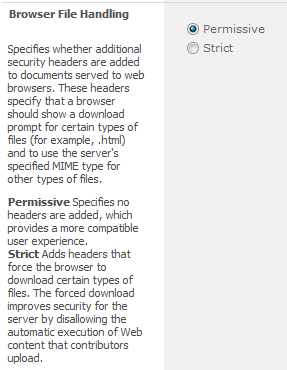
The cause of this behavior is SharePoint 2010 Browser File Handling. This property is on SharePoint Web Application level and its value determines how files are treated in the browser. “Strict” specifies that MIME content types which are not listed in “AllowedInlineDownloadedMimeTypes” are forced to be downloaded. “Permissive” specifies that the HTML and other content types which might contain script are allowed to be displayed directly in the browser. Source: http://msdn.microsoft.com/en-us/library/microsoft.sharepoint.administration.spwebapplication.browserfilehandling.aspx


“AllowedInlineDownloadedMimeTypes” is a collection of MIME types. This list of MIME types does not contain MIME type of Pdf documents by default. It is important to understand that by adding Pdf MIME type to IIS settings you will not solve this issue.

Solution #1 (via User Interface):

The solution is to change Browser File Handling property on Web Application level. For that you need to be a Farm Administrator. Steps to change Browser File Handling property:

  • Go to SharePoint 2010 Central Administration > Application Management > Manage Web Applications
  • Select the row of your web application
  • Click General Settings in the ribbon
  • Scroll down to Browser File Handling and select Permissive
part1-screen2.png
  • Click Ok

Now, your Pdf document will be opened in the browser.

By default, option is set to Strict when creating a web application. When set to Strict, a Pdf document (and other file types) can only be Saved (downloaded), but in Permissive mode, the Pdf document can be opened in the browser by default (this is a setting you can change. See Document Library Settings -> Open in the Client).


Limitation #1:
Once you enabled “Permissive” Browser File Handling, SharePoint will allow all documents be opened in the browser. Today, there is no “out-of-the-box” option to allow Permissive option for Pdf documents only.

Monday, May 7, 2012

Migrate SharePoint 2010 My Sites from default Web Application

Recently I had a client that had setup their "My Sites" in the same web application as their default intranet and wanted to move them to a new web application.
I found several posts on how to exporting my sites like this one and migrating My Sites to a new Content Database but none that actually tacked the issue of moving to a new Web Application.
Well this turned out to be easier than I thought.

  1. Migrate the "My Sites" content to a new content database.
    $db = Get-SPContentDatabase WSS_Content
    Get-SPSite http://portal/personal/* -Limit ALL | where { $_.ContentDatabase -eq $db }
    Get-SPSite http://portal/personal/* -Limit ALL | where { $_.ContentDatabase -eq $db } | Move-SPSite -DestinationDatabase WSS_Content_My_Sites -Confirm:$false
    
  2. Remove this new content database from the current Web Application.
    In Central Admin -> Application Management -> Manage content databases. Select Content DB, in my case WSS_Content_My_Sites and select Remove content database


  3. Create a new Web Application to house the My Sites.
    Central Admin -> Application Management -> Managed web applications -> Select New from the ribbon.  There is no need to create a new site collection since we are going to drop the content database that will be created.
  4. Re-attach the content database previously removed to this new Web Application
    Central Admin -> Application Management -> Manage content databases.
    Make sure you select the correct Web Application and use the correct database name.

  5. Set the Self-Service Site Creation for the new My Site Web Application.
    Central Admin-> Application Manager -> Manage web application -> select site then Self-Service Site Creation in ribbon
  6. Update links in SharePoint to create new "My Sites" in this new location.
    Central Admin -> Application Management -> Manage service applications
    Select User Profile Service then Manage in the ribbon
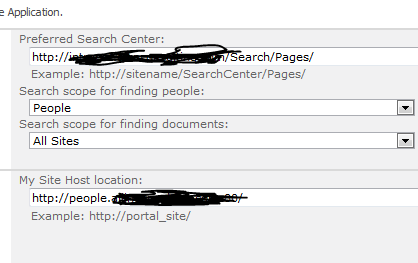
    Under My Site Settings -> Setup My Sites -> update My Site Host location
  7. Remove the content database that was created with the new "My Site" Web Application

Wednesday, January 11, 2012

How to get a SharePoint person field's email adress

This week I had the need to access the email address of a user that was in a person field of a SharePoint list.

Well I incorrectly assumed that this was some flavor of  a SPUser object, turns out the person field in a SPList is a special type SPFieldUser.

Well lets cut to the chase this is the code to access the email address of a SPListItem person column;


private bool EmailUser(SPListItem spListItem, string recordColumn, string subject, string message)
        {
            SPFieldUser spFieldUser = (SPFieldUser)spListItem.Fields[recordColumn];
            SPFieldUserValue spFieldUserValue = (SPFieldUserValue)spFieldUser.GetFieldValue(
                                                    spListItem[recordColumn].ToString());
            if (string.IsNullOrEmpty(spFieldUserValue.User.Email) == false)
                return SPUtility.SendEmail(spListItem.Web, false, false, spFieldUserValue.User.Email, subject, message);
            else
                LogWrite("Error", string.Format("Send Email Error Message")
                                                ,spFieldUserValue.User.Name));
            return false;
        }

Friday, October 28, 2011

How to change the view used by XsltListViewWebPart

So I was in a situation that I needed to change what view was being displayed on a page dynamically.
I am using the the XsltListViewWebPart to display all the values of a list to the user and depending on the user and different properties of the list items I needed to filter the view as well as assign a different XSL file.

The biggest problem I had was that the list view GUID  is created only at deploy time and I could find no other way to assign a different view.

I came across several posts that had examples of changing the view or adding a new XLVWP to the page at deploy time
http://sharepoint.stackexchange.com/questions/4843/reusing-the-xsltlistviewwebpart and http://social.technet.microsoft.com/Forums/zh/sharepoint2010programming/thread/983d2098-d742-4708-8bdc-437aa07b3b9d

So I wanted to take this a little further and be able to dictate what view was used on the fly.  Using a QueryString of the ListID and the ListViewName I then assign the appropriate view in the OnInit event as shown below.


public partial class RecordHistory : DialogLayoutsPageBase
{
     protected void Page_Load(object sender, EventArgs e)
     {
     }
     protected override void OnInit(EventArgs e)
     {
         base.OnInit(e);
         string[] strLists = Request.QueryString.GetValues("ListID");
         string[] strListViewName = Request.QueryString.GetValues("ListViewName");

         if (strLists == null || strLists.Length < 1)
         {
             throw new SPException(SPResource.GetString(Strings.MissingRequiredQueryString, "ListID"));
         }
         SPList spList = SPControl.GetContextWeb(Context).Lists.GetList(new Guid(strLists[0]), true);
         SPView view = spList.Views[strListViewName[0]];
         this.xlvwpRecordHistory.ViewGuid = view.ID.ToString();
         this.xlvwpRecordHistory.ViewId = int.Parse(view.BaseViewID);
         this.xlvwpRecordHistory.XmlDefinition = view.GetViewXml();
     }
}

As always there are many ways to do this that might be better but this worked and I found no other examples of this on the web.
Please let me know if you have a better idea

Monday, June 6, 2011

Basic steps for Moving a SharePoint site collection between domains

Before you start
Make sure SharePoint versions are the same on source and destination servers, service packs and patches.

Permissions
There are some basic permissions that need to be configured (if they have not already).
See Add-SPShellAdmin. If you are using Windows authentication to connect to SQL Server, the user account must also be a member the SQL Server dbcreator fixed server role on the SQL Server instance where the database will be created. If you are using SQL authentication to connect to SQL Server, the SQL authentication account that you specify when you create the content database must have dbcreator permission on the SQL Server instance where the database will be created.

Add-SPShellAdmin -UserName Domain\User Name

Migrate Data
Backup Site Collection on Farm A.
On the server farm that contains the original site collection open a SharePoint 2010 Management Shell.
In the power shell window type the following command:
Backup-SPSite –Identity http://FarmASiteCollection -Path TempPathAndFileName.bak -Force
Force will overwrite a previously backup file.

Create Content Database on Farm B.
Assuming the appropriate Web Application already exists then you just need to create a new content database.
On the server for farm B open a SharePoint 2010 Management Shell.
In the power shell window type the following command:
New-SPContentDatabase -Name ContentDbName -WebApplication WebApplicationName
 -
DatabaseServer DBServerName

Restoring Site Collection on Farm B.
In the power shell window type the following command:
Restore-SPSite –Identity FarmBSiteCollection -Path TempPathAndFileName.bak
-DatabaseServer DBServerName -DatabaseName ContentDbName

Restore Access/Permissions
You need to add a user via command line because the restored site will deny all of your login attempts (unless your server is on the same domain as the original source server).

Using the central administration console, you will note that the site collection still references the original administrators which are now invalid on this new domain.
NOTE: you can view using following steps >> Central Administration >> Application Management >> Site Collection Administrators (on Farm B SharePoint central administration domain).

·         Now you need to change ownership of the site collection using following command.
Set-SPSite –Identity FarmBSiteCollection -OwnerAlias “domain/User”
·         Now if you refresh central admin console you will see the new administrator as an owner, you can change the secondary administrator at this point as well using same utility.
Set-SPSite –Identity FarmBSiteCollection - SecondaryOwnerAlias “domain/User”
·         Now reset the IIS and you can login the main site collection as an administrator.
·         Then you can optionally run this to clean up the old lingering logins explicitly
Move-SPUser –Identity olddomain\UserName  - NewAlias newdomain\UserName

Wednesday, May 18, 2011

BitCoins???? Fascinating concept.

Came across this article not sure I understand all the concept but what an idea.
Is this really going to take off or just die a slow death like many cool concept?


Wednesday, March 16, 2011

Reader Quotas for WCF Services in SharePoint 2010

Creating a WCF service in SharePoint 2010 is relatively easy.  The first thing to do is follow the basic steps in Microsoft's post "Creating a Custom WCF Service in SharePoint Foundation".  This will give you a nice starting point for your Service as long as you don't need to need to change any of the Binding information.

Try sending a 70k file to your nice new WCF service.  Oops  error!

The remote server returned an unexpected response: (400) Bad Request.*
Or

The maximum string content length quota (8192) has been exceeded while reading XML data. This quota may be increased by changing the MaxStringContentLength property on the XmlDictionaryReaderQuotas object used when creating the XML reader.

Ok no problem.  If you have done any WCF Service code in the past you probably know that you need to alter some of the binding information to increase the message size and or change the attributes for the readerQuotas no big deal right? 

Wrong!!! 

SharePoint 2010 has this great new hosting ability MultipleBaseAddressBasicHttpBindingServiceHostFactory and it does all the work required to set up the end points and bindings. You don't need to do create a web.config file or write any WCF service code.

So right about now you should be asking yourself "Self, how do I change the binding information then?".
Well after hunting around for the better part of a day I found a couple of post that talked about using the SPWebService.ContentService to programmatic change the binding information.
For example:


But no where do any of the post talk about where do I run this code.  Wouldn't make sense to run it on the client, although you do need to make some changes on the client side as well.  And running it as a Event Receiver when the feature for the WCF Service is installed did not work for me ether.

So what next???
Well I finally came across a comment on one of the MSDN pages by Dan Mayernik.

First, to update the configuration for a custom WCF service -add a WebApplication level feature with nothing more then a feature receiver. The receiver should override "FeatureInstalled" as follows:


Obviously, the values listed above are the extreme cases and should be set according to what your service will need. Also, the key for the indexer used for the WcfServiceSettings collection is the name of your service file. If you place the file in a subdirectory -do not include the subdirectory name as part of the key.

Thus, if your service is deployed to the ISAPI directory under:
/MyCompany/MyCustomService.svc

the key for the WcfServiceSettings collection would be:
mycustomservice.svc
 

CAUTION: The key, as stated above, is case sensitive. The key should be all lowercase.


Thanks goes to Dan he saved me from loosing any more of my hair (this week)

Monday, July 12, 2010

Reusing file in Visual Studio without copying

This is so silly but I just figured out how to do it and I had to post it (in case someone else is as brain dead as I was).
When you want to add an existing file to your current project in Visual Studio that's located outside the current project's directory, that file is copied into the project folder, then it's added to the project.

Well what if you don't want a duplicate file?

Maybe you want to share the same source file in multiple projects so that if you modify the code in one project (to fix a bug, for example) the updated code is immediately available to the other projects.

I know, I know, most of us would create some sort of shared library for this code and just reference this DLL or even the whole VS project, but to add a shared file all you need to do is instead of clicking the 'Open' button when adding an existing file, click the arrow to the left of this button. Then select 'Link File' from drop down, this way you create a link to the original file without coping it locally.
Simple!

Friday, January 15, 2010

SharePoint 2007 Custom workflow failed to start.


I am doing some custom SharePoint 2007 Workflow development utilizing WSPBuilder and I had this one workflow that just would not run no matter what I did. I disabled all the activities in it except a Workflow History logging activity but still the workflow would not start. I am a little embarrassed to say this was driving me insane for the better part of a day.

No matter what I did when I ran the workflow I would get

1/15/2010 11:06 AM Error
System Account
Trans failed to start. 1/15/2010 11:06 AM Workflow Canceled
System Account
Workflow Trans was canceled by System Account.

I searched through the SharePoint logs over and over again and all I was seeing was unable to load workflow assembly, but I knew it would load since I had other workflows in this library and they all ran no problem.

Here is the error message out of the log file, I hope you spot the problem:

Load Workflow Assembly: System.IO.FileLoadException: Could not load file or assembly 'com.XXXX.Sharepoint.Workflows\, Version\=1.0.0.0\, Culture\=neutral\, PublicKeyToken\=$PublicKeyToken$' or one of its dependencies. The given assembly name or codebase was invalid. (Exception from HRESULT: 0x80131047) File name: 'com.XXXX.Sharepoint.Workflows\, Version\=1.0.0.0\, Culture\=neutral\, PublicKeyToken\=$PublicKeyToken$' at System.Reflection.AssemblyName.nInit(Assembly& assembly, Boolean forIntrospection, Boolean raiseResolveEvent) at System.Reflection.Assembly.InternalLoad(String assemblyString, Evidence assemblySecurity, StackCrawlMark& stackMark, Boolean forIntrospection) at System.Reflection.Assembly.Load(String assemblyString) at ...

Well that part I was not seeing was PublicKeyToken\=$PublicKeyToken.
It turns out that when I created the feature using the WSPBuilder create SyncSharePointWorkflow option it must have had an error I did not notice and this error caused it not to add the PublicKeyToken to the elements.xml file. Or maybe it never did and I just forgot to update this line.

CodeBesideAssembly="com.XXXX.Sharepoint.Workflows, Version=1.0.0.0, Culture=neutral, PublicKeyToken=$PublicKeyToken$"

Anyway once I added the correct Public Key, retracted and redeployed the workflow, it ran fine.

Hope this helps someone else save a day!!!

Thursday, March 12, 2009

Windows Media Center

I dont know how may of you out there are using Windows Media Center for your TV viewing needs, but I have to say http://www.secondrun.tv/ is the best add-on that I have come across yet!
I have completely dropped my Dish Network and almost exclusively use this to watch my favorite shows.

Friday, February 13, 2009

The underlying connection was closed: A connection that was expected to be kept alive was closed by the server

Well the bad news is that this worked for some time but then started to not work again. Looks like i am back to the drawing board.


Ok it took me 2 days to track this down but I think I have solved it.

I have 2 different .net 2.0 libraries in the same application that both access the same third-party Java web service. Oh by the way this worked no problem in .net 1.0

Well this was throwing an System.Net.WebException "The underlying connection was closed:" randomly.

InnerException: System.IO.IOException
Message="Unable to read data from the transport connection: An existing connection was forcibly closed by the remote host."
Source="System"
StackTrace:
at System.Net.Sockets.NetworkStream.Read(Byte[] buffer, Int32 offset, Int32 size)
at System.Net.PooledStream.Read(Byte[] buffer, Int32 offset, Int32 size)
at System.Net.Connection.SyncRead(HttpWebRequest request, Boolean userRetrievedStream, Boolean probeRead)
InnerException: System.Net.Sockets.SocketException
Message="An existing connection was forcibly closed by the remote host"
Source="System"
ErrorCode=10054
NativeErrorCode=10054
StackTrace:
at System.Net.Sockets.Socket.Receive(Byte[] buffer, Int32 offset, Int32 size, SocketFlags socketFlags)
at System.Net.Sockets.NetworkStream.Read(Byte[] buffer, Int32 offset, Int32 size)


I spent forever searching the net looking for a solution to this, with little to no success.
Well I finally came across this link. To resolve this problem you need to disable the keep-alive feature.

In the .NET Framework, you need to set the HttpWebRequest.KeepAlive property to FALSE.
To do this I created a web service reference then modified the generated Reference.cs class and added

protected override System.Net.WebRequest GetWebRequest(Uri uri)
{
HttpWebRequest webRequest = (HttpWebRequest)base.GetWebRequest(uri);
webRequest.KeepAlive = false;
return webRequest;
}

now I know this will probably add a little over-head to my application but so what it solved my devastating error :-)

Wednesday, December 10, 2008

My new HTPC

Ok I just created a new HTPC (Home Theater PC) and let me just say how the hell did I live with out this before. I actually was able to drop my Dish Network service since most of what I was watching is offered online.
When I get a chance I hope to list everything I went thru in creating it.

Tuesday, September 9, 2008

.net Exception list

Jeff Atwood wrote a great little block of code to list all the exceptions in .net. I just needed the most common ones so I posted them here.

System.AppDomainUnloadedException
System.ApplicationException
System.ArgumentException
System.ArgumentNullException
System.ArgumentOutOfRangeException
System.ArithmeticException
System.ArrayTypeMismatchException
System.BadImageFormatException
System.CannotUnloadAppDomainException
System.ComponentModel.Design.CheckoutException
System.ComponentModel.Design.Serialization.CodeDomSerializerException
System.ComponentModel.InvalidEnumArgumentException
System.ComponentModel.LicenseException
System.ComponentModel.WarningException
System.ComponentModel.Win32Exception
System.Configuration.ConfigurationException
System.ContextMarshalException
System.Data.ConstraintException
System.Data.DataException
System.Data.DBConcurrencyException
System.Data.DeletedRowInaccessibleException
System.Data.DuplicateNameException
System.Data.EvaluateException
System.Data.ExprException
System.Data.InRowChangingEventException
System.Data.InvalidConstraintException
System.Data.InvalidExpressionException
System.Data.MissingPrimaryKeyException
System.Data.NoNullAllowedException
System.Data.Odbc.OdbcException
System.Data.OleDb.OleDbException
System.Data.ReadOnlyException
System.Data.RowNotInTableException
System.Data.SqlClient._ValueException
System.Data.SqlClient.SqlException
System.Data.SqlTypes.SqlNullValueException
System.Data.SqlTypes.SqlTruncateException
System.Data.SqlTypes.SqlTypeException
System.Data.StrongTypingException
System.Data.SyntaxErrorException
System.Data.TypedDataSetGeneratorException
System.Data.VersionNotFoundException
System.DivideByZeroException
System.DllNotFoundException
System.Drawing.Printing.InvalidPrinterException
System.DuplicateWaitObjectException
System.EntryPointNotFoundException
System.Exception
System.ExecutionEngineException
System.FieldAccessException
System.FormatException
System.IndexOutOfRangeException
System.InvalidCastException
System.InvalidOperationException
System.InvalidProgramException
System.IO.DirectoryNotFoundException
System.IO.EndOfStreamException
System.IO.FileLoadException
System.IO.FileNotFoundException
System.IO.InternalBufferOverflowException
System.IO.IOException
System.IO.IsolatedStorage.IsolatedStorageException
System.IO.PathTooLongException
System.Management.ManagementException
System.MemberAccessException
System.Messaging.MessageQueueException
System.MethodAccessException
System.MissingFieldException
System.MissingMemberException
System.MissingMethodException
System.MulticastNotSupportedException
System.Net.CookieException
System.Net.ProtocolViolationException
System.Net.Sockets.SocketException
System.Net.WebException
System.NotFiniteNumberException
System.NotImplementedException
System.NotSupportedException
System.NullReferenceException
System.ObjectDisposedException
System.OutOfMemoryException
System.OverflowException
System.PlatformNotSupportedException
System.RankException
System.Reflection.AmbiguousMatchException
System.Reflection.CustomAttributeFormatException
System.Reflection.InvalidFilterCriteriaException
System.Reflection.ReflectionTypeLoadException
System.Reflection.TargetException
System.Reflection.TargetInvocationException
System.Reflection.TargetParameterCountException
System.Resources.MissingManifestResourceException
System.Runtime.InteropServices.COMException
System.Runtime.InteropServices.ExternalException
System.Runtime.InteropServices.InvalidComObjectException
System.Runtime.InteropServices.InvalidOleVariantTypeException
System.Runtime.InteropServices.MarshalDirectiveException
System.Runtime.InteropServices.SafeArrayRankMismatchException
System.Runtime.InteropServices.SafeArrayTypeMismatchException
System.Runtime.InteropServices.SEHException
System.Runtime.Remoting.MetadataServices.SUDSGeneratorException
System.Runtime.Remoting.MetadataServices.SUDSParserException
System.Runtime.Remoting.RemotingException
System.Runtime.Remoting.RemotingTimeoutException
System.Runtime.Remoting.ServerException
System.Runtime.Serialization.SerializationException
System.Security.Cryptography.CryptographicException
System.Security.Cryptography.CryptographicUnexpectedOperationException
System.Security.Policy.PolicyException
System.Security.SecurityException
System.Security.VerificationException
System.Security.XmlSyntaxException
System.ServiceProcess.TimeoutException
System.StackOverflowException
System.SystemException
System.Threading.SynchronizationLockException
System.Threading.ThreadAbortException
System.Threading.ThreadInterruptedException
System.Threading.ThreadStateException
System.Threading.ThreadStopException
System.TypeInitializationException
System.TypeLoadException
System.TypeUnloadedException
System.UnauthorizedAccessException
System.UriFormatException
System.Web.HttpApplication+CancelModuleException
System.Web.HttpCompileException
System.Web.HttpException
System.Web.HttpParseException
System.Web.HttpRequestValidationException
System.Web.HttpUnhandledException
System.Web.Services.Discovery.InvalidContentTypeException
System.Web.Services.Discovery.InvalidDocumentContentsException
System.Web.Services.Protocols.SoapException
System.Web.Services.Protocols.SoapHeaderException
System.Windows.Forms.AxHost+InvalidActiveXStateException
System.Xml.Schema.XmlSchemaException
System.Xml.XmlException
System.Xml.XPath.XPathException
System.Xml.Xsl.XsltCompileException
System.Xml.Xsl.XsltException

Wednesday, July 9, 2008

Xsl function to testing if text only contains footnote marks

The situation come up were I had a table of data and in on of the columns it had just footnote marks. Well I had to merge these footnote marks over to the previous column, but in order to do this I needed to know if the only value in the cell were marks. So I realize there are many ways to do this but I thought this was a cool way. It reads in an external xml file with all the footnote refs I want to search for the ref value is a regex.
<footnotes>
<footnote ref="\*"/>
<footnote ref="\+"/>
<footnote ref="†"/>
<footnote ref="\([a-z]\)"/>
<footnote ref="\([1-9]\)"/>
</footnotes>

I then concat the refs together with a | and do a replace on the string value. If nothing is left then it is a footnote ref.


<!-- Reads all possible footnote ref marks from a footnotes.xml file and if pText only contains footnote marks returns true otherwise false -->
<xsl:function name="txt:IsFootnoteRef" as="xs:boolean">
<xsl:param name="pText" as="xs:string"/>
<xsl:variable name="vFootnotes" select=" document('./footnotes.xml')/footnotes/footnote"/>
<xsl:choose>
<xsl:when test="not($vFootnotes)">
<xsl:value-of select="false()"/>
</xsl:when>
<xsl:when test="not($pText)">
<xsl:value-of select="false()"/>
</xsl:when>
<xsl:when test="normalize-space($pText) = '' ">

<xsl:value-of select="false()"/>
</xsl:when>
<xsl:otherwise>
<xsl:variable name="vFootnoteRef">
<xsl:value-of select="$vFootnotes/@ref" separator="|"/>
</xsl:variable>

<xsl:choose>
<xsl:when test=" normalize-space(replace($pText, $vFootnoteRef , '' , 'i')) = '' ">
<xsl:value-of select="true()"/>
</xsl:when>
<xsl:otherwise>
<xsl:value-of select="false()"/>
</xsl:otherwise>
</xsl:choose>
</xsl:otherwise>
</xsl:choose>
</xsl:function>

Tuesday, March 4, 2008

Comparing XML attributes with parents attributes

I had a need to test if all/most of the attributes of a child node were equal to its parent and strip out the child node if true.

My XML structure was basically:

<PARAGRAPH style='heading1' emphasis='true' font='arial' number='30' indent=’10’>

<SPECIALTEXT style='heading1' emphasis='true' font='arial' number='31'>

Helloworld

</SPECIALTEXT>

</PARAGRAPH>

Output needed to be:

<PARAGRAPH style='heading1' emphasis='true' font='arial' number='30'>

Helloworld

</PARAGRAPH>

Now this only works on the first level after the PARAGRAPH but that’s all I needed, and it could be changed to do this recursively I guess. Basically I am matching on any paragraph that contains a child element SPECIALTEXT with the same style attribute and calling the template CompareKeyAttributes.
PARAGRAPH has more attributes than SPECIALTEXT in most cases so I compare only the ones that exist in SPECIALTEXT.

CompareKeyAttributes will return a string of all the
attributes that don’t match so then I just check if I care that the attribute
is different and output accordingly.

<xsl:template match="PARAGRAPH[SPECIALTEXT[@Style=./@Style] ] ">

<xsl:copy>

<xsl:apply-templates select="@*"/>

<xsl:for-each select=" child::*">

<xsl:variable name="RESULT">

<xsl:call-template name="CompareKeyAttributes">

<xsl:with-param name="PARA" select=".."/>

<xsl:with-param name="SPEC" select="."/>

</xsl:call-template>

</xsl:variable>

<xsl:choose>

<xsl:whentest="$RESULT='number' ">

<xsl:apply-templates select="child::node()"/>

</xsl:when>

<xsl:otherwise>

<xsl:copy>

<xsl:apply-templates select="@*|node()"/>

</xsl:copy>

</xsl:otherwise>

</xsl:choose>

</xsl:for-each>

</xsl:copy>

</xsl:template>

<xsl:template name="CompareKeyAttributes">

<xsl:param name="PARA"/>

<xsl:param name="SPEC"/>

<xsl:for-each select="$SPEC/@*">

<xsl:variable name="SPEC_ATT" select="name()"/>

<xsl:variable name="PARA_ATT" select="$PARA/@*[name()= $SPEC_ATT]"/>

<xsl:choose>

<xsl:when test="$PARA_ATT != .">

<xsl:value-of select="name()"/>

</xsl:when>

</xsl:choose>

</xsl:for-each>

</xsl:template>

Let me know if you find this useful or have anyway to make it better. Enjoy

Tuesday, February 19, 2008

Upgrading MOSS2007 to SP1

Jason had some good references for upgrading MOSS07 to SP1. I have tried the upgrade on my development server with out any issues, but that is a single server env. I will try the upgrade next week on QA servers but anyway here is the link http://blogs.informationhub.com/jnadrowski/archive/2008/01/11/24045.aspx